Securus Mobile
- 4.7
- Rating
- 5.00M
- Installs
- Free
- Price

 Analysis by App-foxy
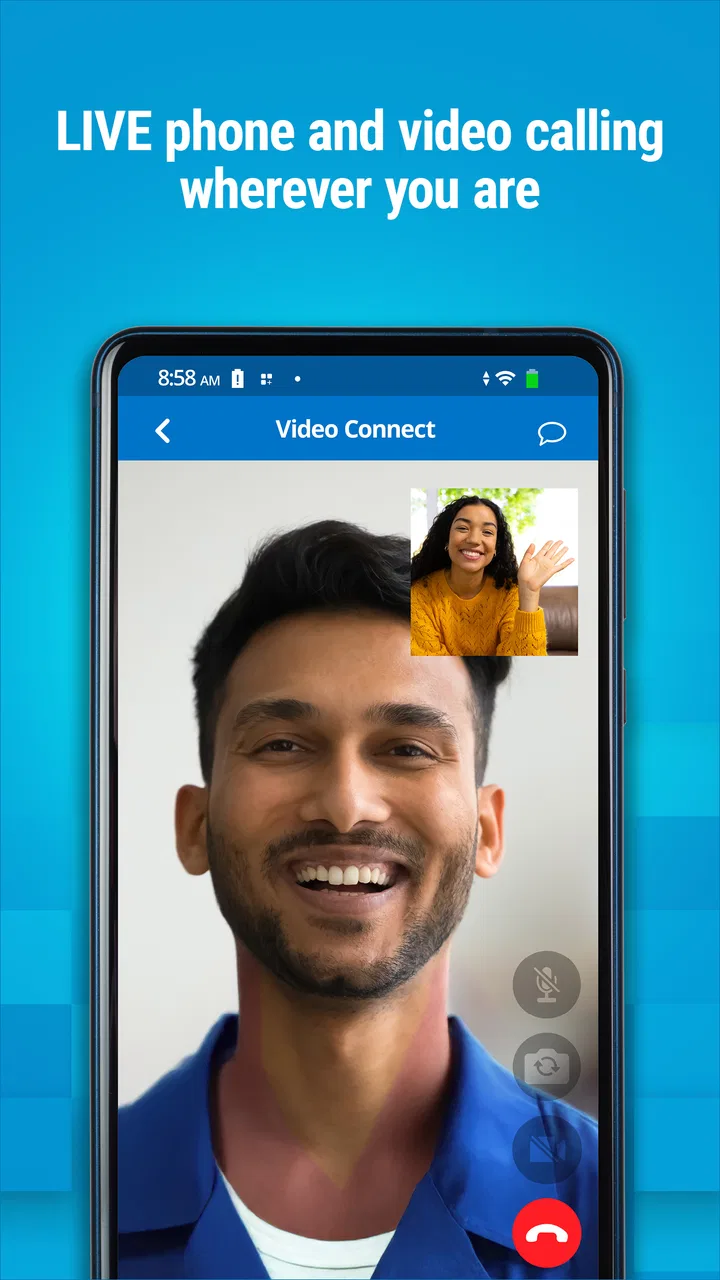
Staying connected with someone in a correctional facility is rarely as simple as opening a familiar messaging app and sending a note. Calls, account funding, and video visits often follow a separate process, and that is where Securus Mobile fits. Developed by Securus Technologies, LLC, this free communication app brings several parts of that process into one mobile interface: managing calling accounts, adding funds, arranging video sessions, and joining those sessions when the time comes.
I see it as a practical service app rather than a general-purpose messenger. It is not trying to replace everyday tools such as WhatsApp, FaceTime, or standard phone apps. Its value depends on whether the facility and the person you need to contact use the Securus system. When that connection exists, having account and video-session tasks together can save a lot of back-and-forth. When it does not, the app has little reason to remain on your phone.
The current Android listing identifies it as version 4.7.0, build 2, with Android 11 as the minimum operating system. It carries a Teen content rating, and its average score is 3.6 from around 29 thousand ratings. That combination tells me to approach it as a useful but service-dependent tool: popular enough to have a substantial user base, yet not so polished that every user should expect a frictionless experience.
You May Also Like

 Blood Strike: 2.5 Anniversary
Blood Strike’s Loadouts Turn Every Drop Into a Tactical Gamble
A close look at Blood Strike’s custom loadouts: how fast access to signature weapons reshapes its battle royale rhythm, rewards preparation, and narrows the gap between fights.

 Pandora - Music & Podcasts
Pandora’s Music Is Easy to Start, but Harder to Recover
Pandora’s strength is its low-effort path from a seed to a station. Its weak spot is how much confidence it asks you to place in connection, setup, and quiet recovery.

 8 Ball Pool
 Is Built on Rivalries, Rematches, and Routine
A close look at the rivalries, rematches, shared routines, and unanswered safety questions that turn a quick pool match into a persistent mobile community.

 Samsung Music
’s Quiet Strength Is Playing What You Already Own
Its reach comes less from spectacle than from dependable access to a personal library. That simplicity is both the app’s strongest retention engine and its ceiling.

 AccuWeather: Weather Radar
AccuWeather Review: A Quick, Clear Forecast for Everyday Decisions
For everyday plans, the best forecast is the one you can understand quickly. AccuWeather makes rain timing, radar, and local conditions easy to act on, with a few trade-offs.

 Hill Climb Racing
Why Hill Climb Racing Still Turns Crashes Into One More Run
A tiny car, a bumpy hill and one more upgrade: Hill Climb Racing keeps resurfacing because its simple chaos makes every near-miss feel personal.
More From Our News Desk



How Securus Mobile fits into real communication routines
I find it helpful to treat Securus Mobile as one part of a communication routine, not as a shared family messenger: the person handling account tasks and the person joining a video session may be different. Keeping those responsibilities clear can reduce last-minute confusion without assuming the app provides household controls. That distinction leads naturally to the practical question of how each user should handle their own access and preparation.
A focused home for calls, funding, and video visits
The most important distinction is that this is an account-management companion for a specific communication network. Instead of treating a call or video visit as an isolated event, the app connects the practical steps around it. You can work with calling accounts, handle funding, and schedule or join video sessions from the same general place.
That matters because the stressful part is often not the conversation itself. It is remembering which account needs money, finding the right scheduled session, and being ready at the expected time. A dedicated app can make those tasks easier to locate than a browser bookmark, especially for someone who checks the service regularly.
In my view, the strongest use case is a family member who is coordinating communication from a phone rather than sitting at a computer. The app is designed for that mobile moment: checking an account while away from home, preparing for a scheduled video visit, or confirming that the right communication workflow is being used before calling.
What a normal day with the app can look like
Imagine that a relative has a video session arranged for the afternoon. I would use the app earlier in the day to review the relevant session details, make sure the correct account is available for the communication process, and avoid leaving every step until the scheduled time. When the appointment arrives, the goal is to open the session from the same app instead of searching through email, a separate website, and the phone’s recent browser tabs.
That workflow is more valuable than it may sound. Video visits are time-sensitive, so a small amount of preparation can prevent avoidable confusion. My practical advice is to treat the app as part of a routine: check the account before the visit, confirm that the phone is using a reliable connection, and open the app a little early rather than waiting until the exact start moment.
The app also makes more sense for people who manage communication for several relatives or who need to revisit funding tasks repeatedly. A general browser can technically handle many account services, but a mobile app gives those actions a dedicated place. The trade-off is that you still have to understand which account or session applies to which contact; the app does not remove the need for careful organization.
Where it differs from ordinary communication apps
Comparing Securus Mobile with regular messaging tools can create the wrong expectation. WhatsApp and similar services are built around quick conversations, contact lists, and instant exchanges between people who already use the same platform. FaceTime focuses mainly on direct video calling. Securus Mobile is more procedural: the account and the scheduled session are central to the experience.
That procedural design is both its reason to exist and its main limitation. If your communication needs are ordinary calls or casual video chats, a mainstream app will usually feel faster and more flexible. If your communication is tied to a Securus-supported facility, those alternatives may not solve the account and scheduling problem at all. In that situation, the specialized design is more relevant than the broader feature set of a consumer messenger.
What the current release tells existing users
The current release is 4.7.0, build 2. I would read that as evidence of an established product rather than a brand-new experiment. The app first appeared on August 13, 2015, so it has had time to become part of a longer-running communication process. That history is useful for existing users because it suggests the app is meant to support an ongoing service, not a one-off event.
At the same time, a version number alone does not promise that every screen will feel modern or that every account issue will be solved inside the app. Product evolution in a service like this is not only about visual changes. The important question is whether the current build makes the high-stakes tasks—funding, scheduling, and joining—clear enough to complete without hesitation.
For someone already using an older installation, updating is sensible when the device supports it, particularly before an important video session. The minimum requirement of Android 11 means older phones may not be eligible to install the current version. That is a meaningful practical consideration: an aging device can become the limiting factor even when the user’s account is otherwise ready.
The effect on people who already depend on it
Existing users are likely to judge the app less by entertainment value and more by reliability during a specific task. A person who only opens it occasionally may appreciate having the main actions grouped together, but may also need a moment to remember the correct account path. Someone who uses it frequently will benefit more from building a repeatable habit around funding and scheduled visits.
I would not recommend experimenting for the first time immediately before an important session. Open the app in advance, become familiar with where the account and video options appear, and keep the phone’s operating system compatible. This is one of the non-obvious strengths of a dedicated service app: once the workflow becomes familiar, it can reduce the mental load of repeating the same administrative steps.
There is also a human factor. Communication with a loved one can already carry emotional pressure, and an unclear payment or scheduling screen adds unnecessary stress. My preferred approach is to separate preparation from the conversation itself. Handle account tasks earlier, then use the scheduled-session area when it is time to connect. That simple separation makes the app feel less like a maze.
Funding is useful, but it changes how you plan
The ability to manage and fund calling accounts is central to the app’s purpose. It means the phone is not merely a viewing device; it becomes part of the administrative process behind calls. That is convenient, but it also means users should pay attention to which account they are managing before completing a funding action.
This is a good place for a careful workflow. I would check the selected contact or account context, review the amount shown on screen, and keep a record of what I intended to fund. The important insight is that mobile convenience can encourage quick taps, while account funding deserves the same attention as any other financial action. The app’s specialized purpose makes this caution more important than it would be in a casual social app.
For households where more than one person uses the service, keeping a simple note of who handles funding and who joins video sessions can prevent duplicated effort. That is not a glamorous feature, but it is a realistic way to work around the fact that the app organizes service actions without automatically organizing family responsibilities.
Video sessions require preparation beyond pressing Join
Scheduling and joining video sessions are among the app’s clearest benefits, but the presence of a join button should not be mistaken for a guarantee that the entire experience will be effortless. A video visit depends on timing, account readiness, device compatibility, and a stable connection. The app can provide the route to the session, while the user still has to prepare the environment.
I recommend checking the phone’s battery, using a quiet location, and avoiding last-minute switching between apps. Those steps are especially worthwhile when the session has a fixed schedule. If the app is being used on a phone shared with other family tasks, closing unnecessary distractions beforehand can make the visit feel more deliberate and reduce the chance of losing track of the session.
A useful trade-off appears here. A mobile device offers flexibility—you can join without being tied to a desk—but it also has a smaller screen and may be more vulnerable to interruptions. Someone who values a larger view may prefer a computer-based route when one is available and supported by the service. Someone who needs mobility may reasonably prefer the app despite that compromise.
Remaining gaps and sources of friction
The first gap is scope. This is not a universal communication platform, so its usefulness is limited to people whose calls and video sessions belong to the Securus environment. A prospective user should identify that connection before spending time learning the app. Installing it in the hope that it will work like a normal messenger is likely to lead to disappointment.
The second gap is the dependence on account and facility processes. The app can bring actions together, but it cannot make every underlying rule feel simple. Users may still need to distinguish between calling-account management and video-session scheduling, and that distinction can matter when time is limited. I would describe the app as a central doorway, not as a replacement for understanding the service itself.
The third issue is the uneven experience suggested by its 3.6 average. A score like that does not tell me which individual problem a particular user will encounter, but it does justify realistic expectations. I would value the app for access to necessary functions while remaining patient with occasional friction in navigation or account handling. It is better judged as a practical necessity for the right audience than as a polished lifestyle app.
There is also a platform barrier. Because the current version requires Android 11, people using older hardware need to check compatibility before planning around it. This is not merely a technical footnote when a scheduled video session matters. If the phone cannot run the current app, the user should investigate an officially supported alternative ahead of time rather than discovering the problem at the appointment.
Who should use it, and who should choose something else
I would recommend Securus Mobile to people who need to manage Securus calling accounts or arrange and join the service’s video sessions from an Android phone. It is especially suitable for users who want a single mobile starting point instead of repeatedly navigating a browser. The app’s free price also removes a separate purchase decision, although communication-related account costs and service conditions should still be considered as part of the wider process.
I would steer casual communicators elsewhere. If your main goal is chatting with friends, sending photos, or making flexible video calls, a general messenger will offer a more natural experience. The same is true for someone whose contact uses a different communication provider. In those cases, Securus Mobile is not a weaker version of a mainstream app; it is simply aimed at a different problem.
I would also be cautious about recommending it to someone with an unsupported older phone until compatibility has been checked. The app’s role is important enough that device preparation should come first. For a user who needs a large screen, a desktop or browser-based option may be more comfortable if the relevant service supports it, while the mobile app remains preferable for people who need to manage visits away from a computer.
What I would watch as the product continues to evolve
For future updates, I would pay closest attention to clarity rather than a long list of new functions. The best improvement would be a smoother path from account selection to funding, followed by an unmistakable route to scheduled video sessions. In a communication app with practical consequences, reducing uncertainty is more valuable than adding decorative features.
I would also watch how well the app serves returning users. A first-time setup matters, but many people will open it only when a call or video visit is approaching. Clear reminders of the relevant account, visible session information, and a dependable return path would make those occasional visits less stressful. These are the areas where product evolution can have a direct effect on real families.
Compatibility deserves attention as well. Since the current build is tied to Android 11 or newer, future changes should continue to balance modern security and performance with access for people who rely on older devices. I would not assume that a newer version automatically solves every device problem; I would check the requirements before updating a phone used for important sessions.
My final assessment
After looking at what the app is designed to do, I see Securus Mobile as a specialized utility with a clear audience. Its best quality is concentration: calling-account management, funding, and video-session scheduling are brought into a service-focused mobile experience instead of being scattered across unrelated tools.
Its weaknesses come from the same specialization. It is not useful outside the Securus communication process, it may require patience when handling account details, and its current Android requirement can exclude older phones. The middling average rating reinforces my view that users should expect practical value rather than perfection.
Still, for the person who needs this particular service, convenience is measured differently. The question is not whether it beats a social messenger at chatting. The question is whether it helps you prepare for a call or video visit with fewer steps and less confusion. If your communication depends on Securus, this free app is worth trying as your main mobile control point—provided your phone is compatible and you prepare important sessions ahead of time.
With over one million installs, it is clearly serving a sizeable audience, and its Teen rating fits the serious communication setting better than a playful social-app image would. My recommendation is therefore conditional but positive: use it when your facility and account require it, build a careful funding and scheduling routine, and keep a backup plan for device or connection problems. For everyone else, a conventional communication app will be the simpler and more appropriate choice.
FAQs for Securus Mobile
01What features does Securus Mobile offer for monitoring?
Securus Mobile provides features such as location tracking, geofencing, and activity monitoring to help users keep track of their loved ones. The app allows real-time location updates and sends alerts when a device enters or exits designated areas, ensuring the safety and security of family members.
02Is Securus Mobile available on both Android and iOS devices?
Yes, Securus Mobile is available for download on both Android and iOS platforms. Users can find the app on the Google Play Store for Android devices and the Apple App Store for iOS devices, ensuring compatibility with a wide range of smartphones and tablets.
03How does Securus Mobile ensure data privacy and security?
Securus Mobile employs robust encryption protocols to protect user data, ensuring that personal information and location details remain confidential. The app adheres to industry-standard privacy regulations, providing peace of mind for users concerned about data security and unauthorized access.
04What is the cost associated with using Securus Mobile?
Securus Mobile offers a subscription-based model with various pricing tiers depending on the number of devices and features required. Users can choose a plan that fits their needs, with options for monthly or yearly subscriptions. It's advised to check the latest pricing on the app's official website or app store listing.
05Can Securus Mobile be used internationally?
Yes, Securus Mobile can be used internationally as it supports global location tracking. However, users should ensure their mobile data plan includes international roaming or has internet access abroad to maintain consistent app functionality. It's advisable to confirm compatibility in specific countries before traveling.
Pros
- User-friendly interface for easy navigation.
- Real-time alerts for immediate notifications.
- Secure login options enhance privacy.
- Comprehensive monitoring features available.
- Supports multiple devices seamlessly.
Cons
- Requires stable internet for optimal use.
- Some features need premium subscription.
- Limited customization of alert settings.
- Occasional lag during peak usage times.
- May drain battery faster on older devices.

Securus Mobile
Gallery